
PR Feedback Loop
This page describes Otto Builder, Otto's ticket-driven workflows that work from Linear or Jira tickets. It is separate from Otto Detective, the pull request reviewer, which never commits, pushes, or merges. Start with the Introduction for Otto Detective.
Otto doesn't just create PRs — it responds to code review feedback and makes changes.
How It Works
When someone leaves a review comment on an Otto-created PR:
- Otto reads the feedback — Understands the question or request
- Makes changes — Modifies the code or adds clarifying comments
- Pushes a new commit — Updates the PR with the fixes
- Responds inline — Explains what was changed and why
Real Example
Here's Otto responding to a code review question on its own PR:
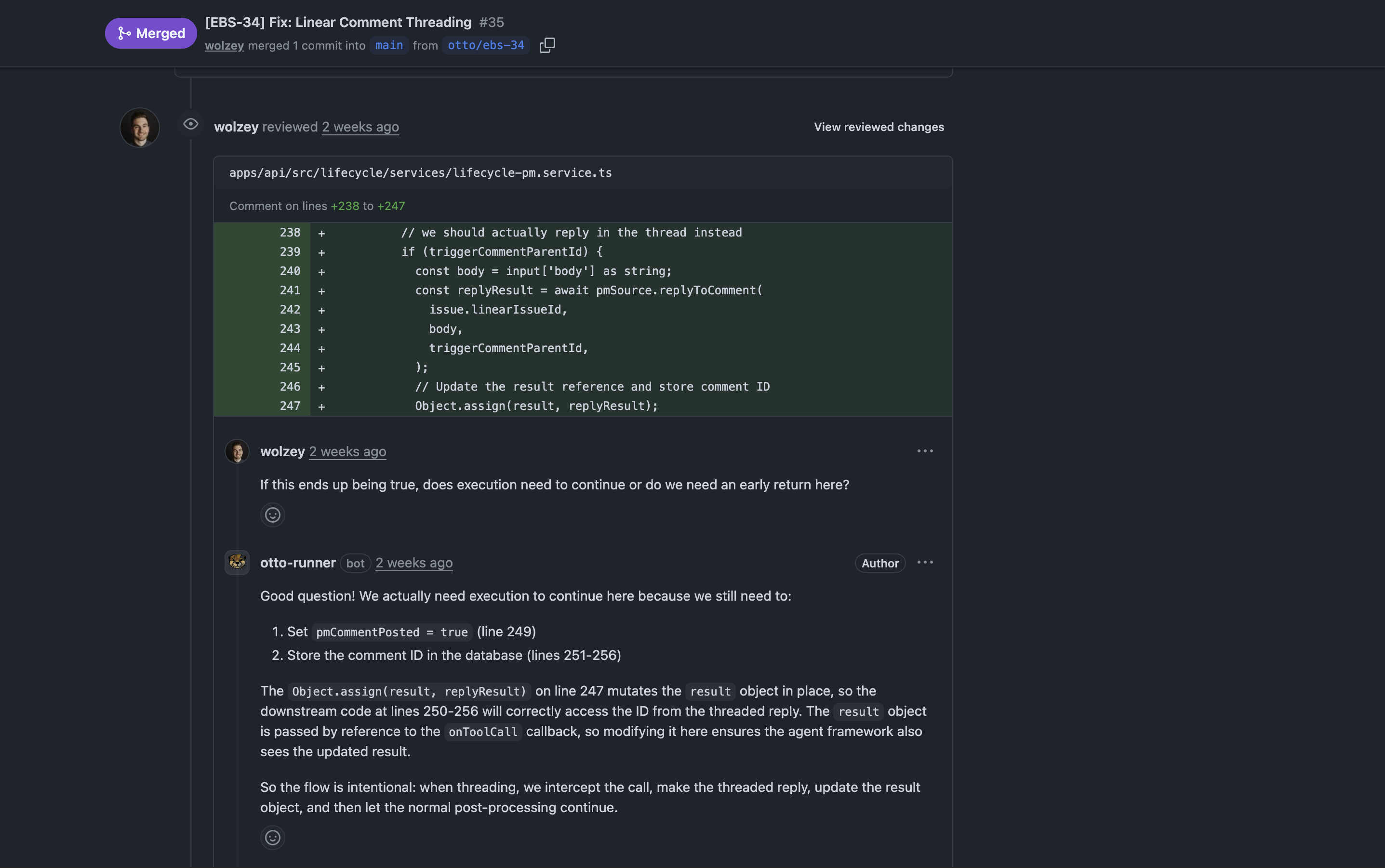
In this example:
- Reviewer asked: "Does execution need to continue or do we need an early return here?"
- Otto explained: Why execution must continue (to set flags and store IDs)
- Otto clarified: Added a code comment in a follow-up commit to prevent future confusion
The entire interaction happened inline on the PR, just like a human engineer would respond to feedback.
What Otto Handles Well
Questions About Logic
Otto can explain why it implemented something a certain way, referencing line numbers and walking through the control flow.
Code Improvements
- Adding null checks or validation
- Refactoring nested logic into early returns
- Extracting helper functions
- Fixing off-by-one errors
Style and Conventions
- Using const vs let
- Adding type annotations
- Following naming patterns
- Applying consistent formatting
Bug Fixes
- Handling edge cases (null/undefined)
- Correcting error codes (404 vs 500)
- Fixing race conditions
Best Practices
Be specific: "Add email validation using class-validator" beats "add validation"
One topic per comment: Break complex feedback into separate review comments
Use GitHub suggestions: Otto applies inline code suggestions directly
Ask questions: Otto can explain its implementation choices — don't hesitate to ask "why?"
When to Use a New Ticket Instead
For major changes like:
- Architectural refactoring across multiple files
- Changing core design decisions
- Adding entirely new features
Consider creating a new ticket with updated requirements instead of requesting major rework in code review. Otto's lifecycle flow (clarify → plan → implement) handles substantial changes better than PR feedback.